

300 nits is about 50% brighter than 200 nits. That extra brightness helps in bright rooms, while 200 nits is usually enough for a dim or controlled-light room.
Brightness is measured in nits, and a higher number means the screen can get brighter. But a bigger number is not always better for you. This guide compares 300 and 200 nits so you can pick the right level for your room and your work.
What Are Nits?
One nit equals one candela per square meter (cd/m²). It tells you how much light a screen gives off. The figure on a spec sheet is normally the maximum, so you can always turn a bright monitor down. Read what monitor brightness is for more background.
300 Nits vs 200 Nits at a Glance
| Feature | 200 Nits | 300 Nits |
|---|---|---|
| Brightness | Lower maximum | About 50% higher maximum |
| Dim or dark room | Comfortable | Comfortable (turn it down) |
| Normal indoor lighting | Usually fine | Clear and easy to see |
| Bright room or window glare | Can look dim | Holds up better |
| Sunlight or outdoors | Hard to see | Still not enough |
| Power use | Generally lower | Generally higher at maximum |
When 200 Nits Is Enough
A 200-nit screen works well in rooms with controlled lighting. Office work, reading and web browsing are comfortable at this level, and many people set their monitor below its maximum anyway. It can look dim if sunlight or strong lamps hit the screen.
When 300 Nits Is Better
- Bright rooms: extra brightness helps the picture stay clear against room light.
- Gaming and movies: bright scenes look a little punchier. See is 300 nits bright enough for gaming.
- Flexibility: you can turn a brighter screen down at night, but a dim screen cannot go above its limit.
Glare matters as much as the number. A matte screen placed away from a window can look better than a glossy brighter one facing the light.
What About HDR and Outdoors?
Neither level is enough for HDR. The entry-level VESA DisplayHDR 400 tier needs a peak brightness of 400 nits, and higher tiers such as DisplayHDR 600 need 600 nits. See what HDR in a monitor means. For a step up from 300, read what 500 nits brightness is. Outdoors in daylight, both 200 and 300 nits are hard to see, and you need a much brighter display.
Which Should You Choose?
- Choose 200 nits if you work in a dim or controlled room and want to save money.
- Choose 300 nits if your room is bright, or you want more headroom.
- Choose 400 nits or more if you want entry-level HDR support.
Brightness is only one spec. Resolution, refresh rate, panel type and color accuracy matter too, and they do not depend on whether a monitor is 200 or 300 nits. We hand-pick and test monitors before recommending them, so check the picks below.
Recommended Bright Gaming Monitors
| Photo | Monitor | Key specs | Deal |
|---|---|---|---|
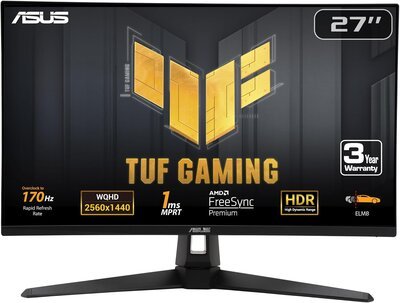 | ASUS TUF Gaming 27” 1440P (VG27AQA1A) Best for: 170Hz QHD gaming | 2560 x 1440 QHD, 170Hz refresh rate (supports 144Hz), 1ms response time | Check Price |
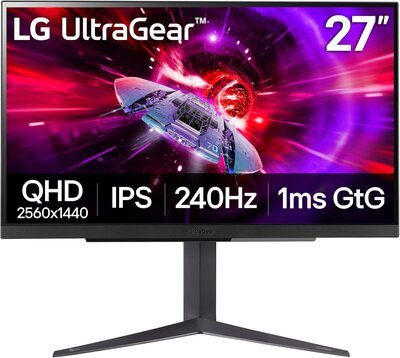 | LG 27GR83Q-B UltraGear QHD Best for: bright-room gaming with DisplayHDR 400 | 27-inch QHD (2560 x 1440), 240Hz, 1ms, DisplayHDR 400 | Check Price |
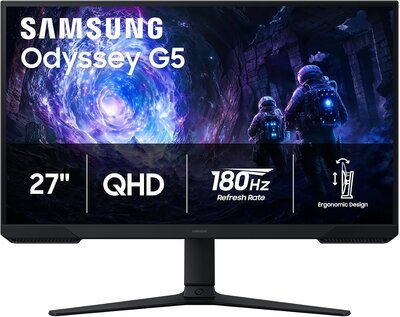 | Samsung Odyssey G5 G51F Best for: 16:9 QHD gaming | 27-inch 16:9 QHD 2560 x 1440, matte, 180Hz, 1ms | Check Price |
See the full list: Best 144Hz Monitors and Best 27 Inch Monitors
As an Amazon Associate, we earn from qualifying purchases.
Frequently Asked Questions
Is 300 nits brightness good?
Yes, for indoor use. It is clear in typical lighting and bright enough for most rooms.
Is 200 nits too dim?
No, not for a dim or controlled-light room. It can look dim when sunlight or strong lights hit the screen.
Is 300 nits bright enough for outdoors?
No. Outdoors in daylight you need a much brighter display, and glare is still a problem.
Is 300 nits good for HDR?
Not really. HDR relies on bright highlights, and even the entry-level DisplayHDR 400 tier requires 400 nits of peak brightness.
Conclusion
For most indoor users, both levels work. Pick 300 nits for brighter rooms and more headroom, or 200 nits for a dim, controlled space. For HDR or sunny rooms, look at brighter monitors.

Wyatt Foster is a seasoned gaming and tech writer known for his engaging writing style and in-depth analysis of the latest monitors. With a keen eye for design and a love for all things pixelated, he guides readers through the ever-evolving landscape of gaming displays, making complex concepts accessible to both tech enthusiasts and casual gamers.